QR Codes Explained: How They Work and How to Make Your Own
Last year I printed 500 table cards for a client's conference. Each had a QR code linking to the event schedule. On setup day we realized the URL had a typo — the codes pointed to a 404 page. Five hundred cards, useless. That was the day I really started paying attention to how QR codes work, and more importantly, how to not mess them up.
The thing is, QR codes are absurdly simple to create. You can make one in about ten seconds with a free generator. But that simplicity is deceptive. The difference between a QR code that works flawlessly and one that frustrates every person who scans it comes down to a handful of decisions most people skip right over.
This guide is everything I've learned about QR codes from using them in real projects — client work, event materials, product packaging, internal tools. Not a Wikipedia summary. Practical knowledge you can use the next time you need to slap a scannable square on something.
What's actually inside a QR code
If you look at a QR code and just see random noise, that's fair. But every single pixel — they're called "modules" — is placed deliberately. The whole thing is a carefully structured data container, and once you understand the parts, you'll never look at one the same way.
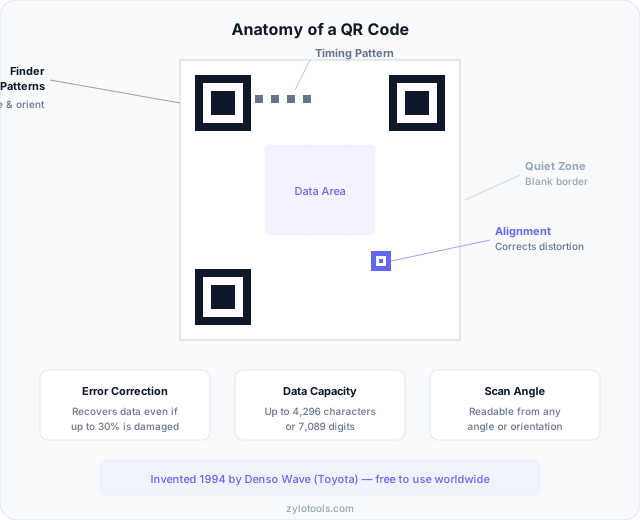
The three big squares in the corners? Those are finder patterns. They're how your phone's camera knows "hey, this is a QR code" and figures out which way it's oriented. You can scan a QR code upside down, sideways, at an angle — the finder patterns make that possible. There's always exactly three of them, positioned so the scanner can calculate perspective and rotation.
Between the finder patterns you'll notice a line of alternating black and white modules. Those are timing patterns, and they tell the scanner how big the grid is. Think of them like a ruler that lets the decoder figure out where each row and column falls.
Larger QR codes also have alignment patterns — smaller squares scattered through the code. These help correct for distortion. If the code is printed on a curved surface or your camera catches it at a weird angle, alignment patterns help the software straighten things out.
Everything else is the data area and error correction. The data area is where your URL or text lives, encoded as a binary pattern. The error correction is genuinely clever — it uses Reed-Solomon algorithms (the same math used in CDs and satellite communications) to add redundancy. Depending on the level you choose, a QR code can still be read even if up to 30% of it is damaged or covered.
And that blank border around the whole thing? That's the quiet zone. It needs to be there so the scanner can distinguish the code from whatever's around it. Skip it and you'll get scan failures.
Static vs dynamic — which one do you actually need?
This is the first real decision you make when creating a QR code, and getting it wrong can cost you. I've seen businesses print thousands of flyers with dynamic codes, then let their subscription lapse — every single code stops working overnight.
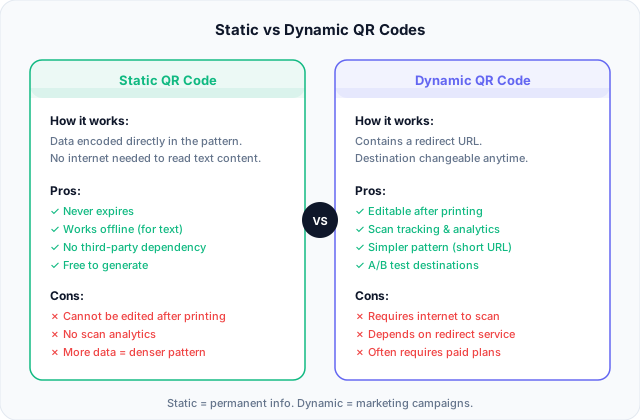
Static QR codes bake the data directly into the pattern. The URL, text, or WiFi password is literally encoded in those black and white modules. Once created, it works forever. No internet connection needed for text-based content. No service to maintain. No subscription to forget about. The downside? If you need to change the destination, you have to create and print a new code.
Dynamic QR codes work differently. Instead of encoding your actual URL, they encode a short redirect URL (something like qr.service.com/abc123). When someone scans it, they hit that redirect, which then sends them to your real destination. This means you can change where the code points without reprinting anything. You also get scan analytics — how many people scanned, when, where, what device they used.
So which do you need? Here's my rule of thumb:
- Use static when the content won't change — WiFi passwords, permanent landing pages, contact cards, text messages, physical product info
- Use static when the code needs to work offline or in areas with poor connectivity
- Use dynamic when you're running a campaign and might need to swap the destination URL
- Use dynamic when you need scan tracking and analytics
- Use dynamic when the URL is extremely long (the redirect keeps the code simpler)
For most people creating a code for personal use or a one-off project, static is the right call. It's simpler, it's free, and it never breaks. If you're running marketing campaigns at scale and need flexibility, dynamic makes sense — just make sure you trust the service behind it. Our QR code generator creates static codes that work permanently with no account required.
Where QR codes actually get used (not just marketing buzzwords)
Every "QR code guide" lists the same generic use cases. Let me share what I've actually seen work in practice, and a few places where they're quietly transforming workflows that most people don't think about.
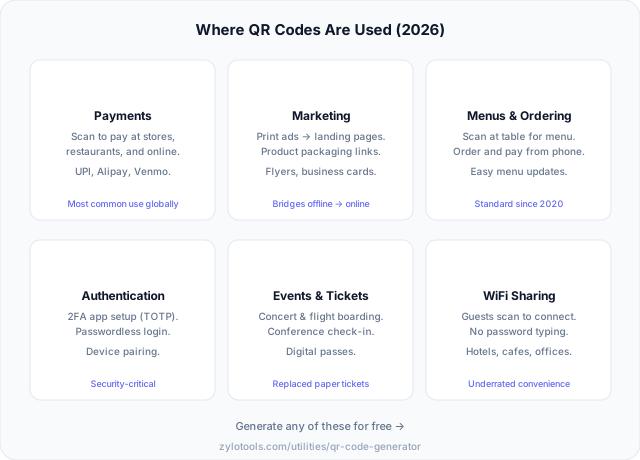
Payments. This is the big one globally. In many countries, QR-based payments are the default — not the novelty. You scan a merchant's code, enter an amount, done. No card reader hardware needed. I've seen food trucks and market stalls operate entirely on QR payments. The barrier to accepting digital payments dropped to essentially zero.
Restaurant ordering. The pandemic accelerated this, but it stuck because it genuinely works. Scan the code, see the menu, order from your phone. Restaurants save on printing costs and can update prices or items instantly. The bad implementations (tiny codes, broken links, non-mobile sites) give this a worse reputation than it deserves.
Two-factor authentication. Every time you set up an authenticator app, you're scanning a QR code. It encodes the shared secret and account information so you don't have to type a 32-character string manually. This is probably the most security-critical use of QR codes most people encounter regularly.
Event management. Tickets, badges, check-in systems. I've worked on events where every attendee had a unique QR on their badge. Scanning it at session doors tracked attendance, controlled access to VIP areas, and even handled food voucher redemptions. One code, multiple uses throughout the day.
WiFi sharing. Encode your network name and password into a QR code, print it, stick it on the wall. Guests scan and connect. No more spelling out "the password is capital-B-lowercase-r-number-7..." This alone has saved me more awkward interactions than I can count. You can create one with our QR generator in seconds — just select WiFi mode.
Product tracking and authentication. This is where QR codes get interesting for businesses. Unique codes on individual products let customers verify authenticity, let manufacturers track items through supply chains, and let retailers manage inventory. Luxury brands use them heavily to combat counterfeiting.
The pattern I see across all these uses: QR codes work best when they solve a real friction point. Replacing an action that was annoying or slow (typing a URL, entering WiFi credentials, fumbling with a paper ticket) with a quick scan. They fail when they're added without purpose — a QR code on a billboard that just links to a homepage nobody wanted to visit anyway.
How to generate a QR code (it takes about 10 seconds)
I'm not exaggerating on the time estimate. If you already know what you want to encode, making the code itself is the fastest part of the whole process. Here's how to do it with the Zylo Tools QR Code Generator:
Step 1: Pick your content type. Open the generator and select what you're encoding — a URL, plain text, WiFi credentials, email address, phone number, or SMS. Each type structures the data differently so scanners know how to handle it.
Step 2: Enter your data. Type or paste the content. For URLs, always include the full address with https://. For WiFi, you'll enter the network name, password, and encryption type. Keep it as short as reasonably possible — shorter content creates simpler codes that scan more reliably.
Step 3: Choose your error correction level. You'll typically see four options: Low (7% recovery), Medium (15%), Quartile (25%), and High (30%). Higher error correction means more of the code can be damaged and still work. If you're planning to add a logo over the center, use High. For clean, unobstructed codes, Medium is fine.
Step 4: Download in the right format. For anything going to print — business cards, posters, packaging — download as SVG. It scales to any size without losing quality. For digital use (websites, emails, social media), PNG works great. Avoid JPEG for QR codes — the compression can blur module edges and cause scan failures.
Step 5: Test before you commit. This is the step everyone skips and then regrets. Scan your code with at least two different phones. Try it in different lighting. If it's going on a colored background, test it on that background. If it's going to be printed small, print a test at actual size and scan that. I cannot overstate how important this is.
https://example.com/events/2026/summer-conference/registration?ref=flyer creates a much denser code than https://example.com/go/summer26. Simpler codes scan faster and work better at small sizes. Tools like our word counter can help you keep text content concise.
The mistakes that make QR codes fail
I've debugged more broken QR codes than I'd like to admit — both mine and other people's. The failure modes are surprisingly consistent. Here's what goes wrong most often, and all of it is preventable.
Too small to scan. This is the number one killer. People shrink QR codes to fit into tiny spaces and then wonder why nobody scans them. Your phone's camera needs to resolve individual modules clearly. If the code is too small or too far away, it's just a blurry square. I've seen codes printed at 1cm on business cards that literally cannot be scanned by any phone.
Low contrast colors. A light grey code on a white background? That's not going to scan. Yellow on white? Nope. The scanner needs clear contrast between modules and background. Dark on light works best. Black on white is bulletproof. If you must use colors for branding, keep the foreground dark and the background light, and test extensively.
No call to action. This isn't a scanning failure — it's a human failure. A bare QR code sitting on a poster with no context tells the viewer nothing. Why should they scan it? What will they get? "Scan for 20% off" works. "Scan for the full menu" works. A mysterious unmarked square does not work. People need a reason.
Linking to non-mobile pages. Every QR code gets scanned by a phone. Every single one. If your code links to a desktop-only website with tiny text and hover menus, you've just wasted everyone's time. Make sure the destination is mobile-friendly. Test it on an actual phone screen, not just by resizing your browser window.
Not testing before mass printing. I mentioned this in the generation section, but it bears repeating because I've seen it happen to professionals who should know better. Print 10 test copies at final size, on the actual material. Scan them in the lighting conditions they'll be used in. Glossy materials create glare. Dark materials can absorb the code. Discover these problems when you can still fix them, not after you've printed 10,000 brochures.
Overcrowding the quiet zone. Putting text, borders, or design elements too close to the code confuses scanners. The quiet zone — that blank border around the code — isn't optional decoration. It's part of the specification. Maintain at least a 4-module-wide clear area on all sides.
Best practices I've learned from actual projects
These aren't theoretical recommendations from a spec sheet. They're lessons from printing codes on conference lanyards, embedding them in email signatures, putting them on product packaging, and sticking them on construction site equipment. Some I learned the hard way.
Size guidelines that actually work:
- Business cards and close-range scanning: minimum 2cm x 2cm
- Flyers, brochures, table tents: 3-4cm works well
- Posters (1-2 meter scanning distance): at least 10-15cm
- Banners and signage (3+ meters): 30cm or larger
- The 10:1 rule as a universal fallback: scanning distance divided by 10 equals minimum code size
Always include CTA text near the code. I put this in every project spec now. The code itself never appears alone. There's always a short line of text explaining what happens when you scan: "Scan for schedule," "Scan to connect to WiFi," "Scan to save contact." Even tech-savvy users appreciate knowing what they'll get before they point their camera.
Test on at least 3 devices before approving for print. Different phones have different cameras, different scanning algorithms, different ambient light handling. I test on an iPhone, an Android flagship, and an older/budget Android phone. If all three scan reliably in 1-2 seconds, the code is good to go. If the budget phone struggles, the code is probably too dense or too small.
Use high error correction when adding logos. If you're overlaying a brand logo on the center of a QR code (which is popular for marketing materials), you're literally covering data modules. Set error correction to High (30%) and keep the logo to no more than about 20% of the code's area. Then test aggressively — logo placement that works on screen sometimes fails in print.
Shorter URLs create simpler patterns. Every character in your data adds modules to the code. A 200-character URL creates a visibly more complex code than a 30-character one. Complex codes need to be printed larger to scan reliably. If you're working with limited physical space, shorten your URL first. You can create and track short links with many free services, or set up a redirect on your own domain.
Consider the scanning environment. Where will this code be scanned? Outdoors in bright sunlight? In a dimly lit restaurant? On a moving conveyor belt? On a glossy surface that creates glare? Each environment affects scannability. High-contrast codes handle adverse conditions better. Matte finishes outperform glossy ones. White backgrounds reflect more light for the camera to work with.
If you're generating secure passwords for WiFi and encoding them into QR codes, use a strong random password — since nobody has to type it manually, length and complexity cost nothing in usability.
Security — can QR codes be dangerous?
Let's be clear about what the actual risk is here, because there's a lot of overblown fear and not enough practical advice.
A QR code is a data container. That's it. It cannot install malware on your phone by itself. It cannot hack your device just by being scanned. The code is decoded into text — usually a URL — and your phone shows you what it says before taking action. On modern smartphones, scanning a QR code doesn't automatically open the link. You see a preview and choose whether to proceed.
The real risk is social engineering. A QR code can point to a phishing site that looks like your bank's login page. It can link to a page that tries to get you to download a malicious app. It can encode a phone number that connects you to a premium-rate scam line. The danger isn't in the code — it's in what's on the other end and whether you trust it.
Practical security habits:
- Check the URL preview before opening. Your phone shows it — actually read it.
- Be cautious with codes in unexpected places. A sticker placed over a legitimate code on a parking meter is a known scam technique.
- Don't scan codes from unsolicited physical mail or random flyers without a clear source.
- If a code asks you to download an app, go to the official app store instead of using the direct link.
- For sensitive actions (banking, payments), navigate to the site directly rather than through a QR code.
That said, don't let security paranoia stop you from using QR codes entirely. They're as safe as any link on the internet — which is to say, use common sense. If you'd click the link in a browser, scanning the code is equally fine. For tips on keeping your accounts safe regardless of how you navigate to them, check our guide on creating strong passwords.
Frequently Asked Questions
What is a QR code and how does it work?
A QR code is a two-dimensional barcode that stores information in a grid of black and white squares called modules. When you scan one with your phone camera, the software detects the finder patterns in three corners to locate and orient the code. It then reads the data area module by module, applies error correction to fix any scanning errors, and decodes the binary data into readable content. QR codes can encode URLs, plain text, phone numbers, WiFi credentials, email addresses, and more.
Are QR codes free to create?
Yes. The QR code format itself is open and completely royalty-free — Denso Wave, the inventor, released it for public use. Many generators (including ours) let you create static QR codes at no cost with no account required. Static codes encode data directly and never need an ongoing service. Dynamic codes with features like scan tracking, URL editing, and analytics may require paid subscriptions from the service provider, but the basic technology is free for everyone.
Do QR codes expire?
Static QR codes never expire. The data is encoded directly in the pattern itself, so as long as the physical code is readable, it works — no internet connection, no service, no subscription needed. Dynamic codes are different: they depend on a redirect service to forward scans to your destination URL. If that service goes offline, discontinues your plan, or shuts down entirely, the redirect breaks and the code becomes useless. For anything permanent, use static. For anything dynamic, choose a reliable provider.
How much data can a QR code store?
At maximum capacity, a QR code can hold 7,089 numeric characters or 4,296 alphanumeric characters. But maximum capacity creates extremely dense codes that require large print sizes to scan reliably. In practice, you want to keep data short. A typical URL of 50-100 characters creates a comfortably scannable code at reasonable sizes. For anything longer, consider using a URL shortener or linking to a page that contains the full information rather than trying to encode everything directly.
Can QR codes be hacked or dangerous?
The QR code itself is just data — it cannot execute code or install anything on your device. However, like any link, it can point to a malicious website. Scammers sometimes place stickers with malicious QR codes over legitimate ones (on parking meters, for example). Modern smartphones show a URL preview before opening the link, so always check the destination before tapping. Don't scan random codes without context, verify the domain looks legitimate, and when in doubt, navigate to the site directly through your browser instead.
Want to make one right now?
Type a URL, a message, or your WiFi password. Your QR code generates instantly in your browser.
Generate a QR Code — Free →