AI Grammar Checker: Improve Your Writing Like a Professional
Here's an uncomfortable truth about professional writing: the people who need proofreading most are the people least able to proofread themselves. After three hours immersed in a document, your brain starts reading what you meant to write rather than what's actually on the page. You'll miss the same typo fifteen times because your mind fills it in automatically.
I write for a living. I've been doing it for years. And I still run my work through a grammar checker before it goes anywhere important. Not because I don't know the rules — I do — but because fatigue, speed, and familiarity with my own text create blind spots that no amount of expertise eliminates. The tool catches what my tired eyes skip. Every single time, it finds at least one thing.
What surprises most people isn't that grammar checkers exist — everyone knows about them — but how much better the modern AI-driven ones have become compared to the red-squiggly spell checkers of ten years ago. They understand context now. They catch errors that depend on sentence structure, not just individual word spelling. And some of them do it entirely in your browser without sending your writing anywhere.
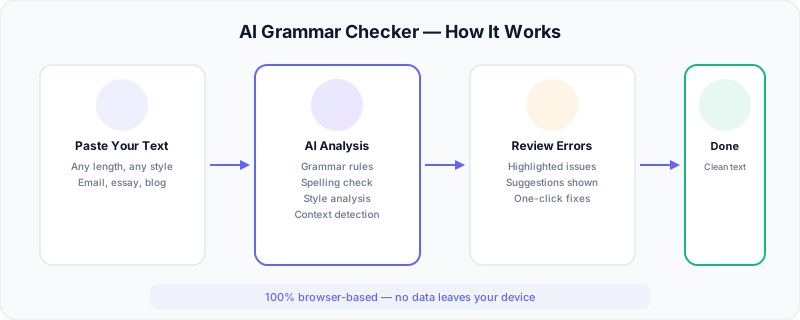
How AI Grammar Checkers Work
Modern grammar checkers have moved far beyond simple spell-check. They rely on a combination of technologies that work together to understand language at a deeper level than pattern-matching alone could ever achieve.
Natural Language Processing
At the core of every AI grammar checker sits a Natural Language Processing engine. NLP allows the software to parse sentence structure — identifying subjects, verbs, objects, clauses, and modifiers — much like diagramming sentences in school, but at machine speed. This structural awareness is what separates a real grammar checker from a basic spell-checker that only knows individual words.
When you write "The team of engineers are meeting tomorrow," the NLP engine identifies "team" as the subject (singular), not "engineers" (which is just part of a prepositional phrase). It then flags "are" as incorrect because a singular subject requires "is." Without structural parsing, this error would be invisible to simpler tools.
Pattern Recognition and Statistical Models
AI grammar checkers train on billions of words of published, edited text — books, newspapers, academic journals, business writing. Through this exposure, they develop statistical models of what "correct" English looks like. They learn that certain word combinations are common and natural while others are unusual and likely erroneous.
This statistical approach catches problems that rigid rules miss. For example, "I could care less" is technically grammatical, but the intended expression is "I couldn't care less." A pattern-recognition system identifies this because it has seen the correct form millions of times and knows the incorrect version appears almost exclusively as a mistake.
Contextual Analysis
The most sophisticated grammar checkers analyze context beyond the individual sentence. They consider the paragraph, the document type, and even the apparent tone to calibrate their suggestions. A sentence fragment might be acceptable in a blog post but inappropriate in an academic paper. Contextual analysis allows the tool to adjust its strictness based on what you appear to be writing.
This is also how better tools distinguish between homophones. "Their," "there," and "they're" all pass spell-check, but context determines which is correct. The sentence "The students submitted there assignments" is grammatically parsed to recognize that a possessive pronoun is needed, not a location word.
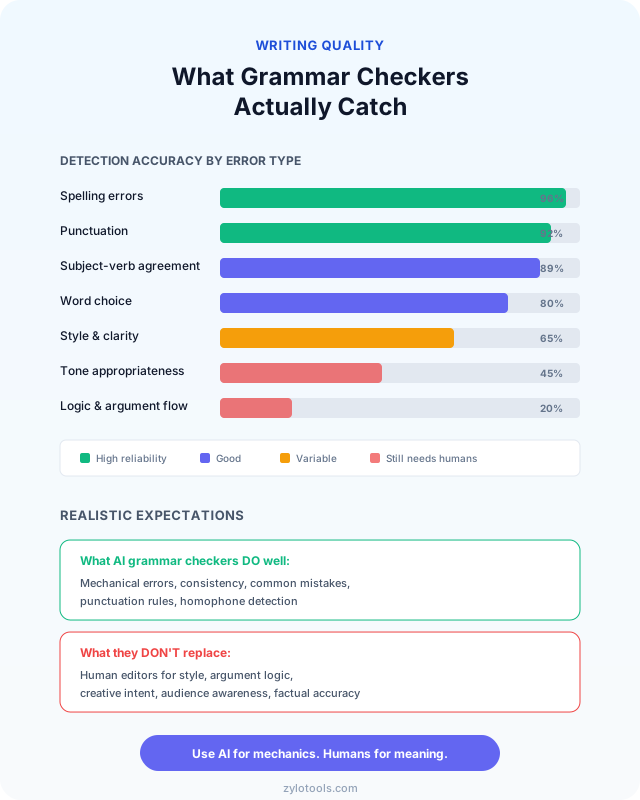
What Grammar Checkers Can (and Can't) Do
Setting realistic expectations prevents frustration. Grammar checkers are powerful, but they have clear boundaries that every writer should understand before relying on them.
What They Do Well
Grammar checkers excel at mechanical corrections — the kind of errors that follow consistent, learnable rules. Spelling mistakes, punctuation errors, subject-verb disagreements, tense shifts, and basic word choice problems are caught with high reliability. These tools are also fast, consistent, and tireless. Unlike a human proofreader who gets fatigued after reading for an hour, a grammar checker applies the same attention to the last paragraph as it does to the first.
They also catch embarrassing mistakes that manual proofreading often misses. Double words ("the the"), missing articles ("she went to store"), and accidental homophone substitutions ("your welcome") are flagged instantly. For anyone producing written content under time pressure, this safety net is invaluable.
What They Struggle With
Grammar checkers cannot evaluate the quality of your ideas, the logic of your arguments, or the persuasiveness of your prose. They do not know whether your evidence supports your thesis, whether your tone matches your audience, or whether your structure guides readers effectively through your content.
They also struggle with intentional rule-breaking. Literary devices like sentence fragments for emphasis, deliberately casual tone in informal writing, and rhetorical repetition may all get flagged as "errors" when they are actually deliberate choices. Creative writers often find grammar checkers more annoying than helpful because the tools lack awareness of artistic intent.
Highly specialized vocabulary and industry jargon also cause problems. Medical terms, legal language, and technical terminology may be flagged as misspellings or unusual constructions. Writers in specialized fields need to train their tools (or ignore specific suggestions) to work effectively.
The Realistic Sweet Spot
Think of a grammar checker as a skilled copyeditor who catches surface errors but does not evaluate content. It handles the mechanical layer of writing — spelling, grammar, punctuation — so you can focus your limited proofreading energy on style, clarity, and substance. This division of labor makes both you and the tool more effective than either could be alone.
Types of Errors AI Catches
Understanding the categories of errors that AI grammar checkers detect helps you appreciate what these tools offer and recognize their blind spots.
Spelling and Typos
Beyond obvious misspellings, AI catches contextual spelling errors — words that are spelled correctly but wrong for the context:
- Wrong: "The company will loose money this quarter."
- Correct: "The company will lose money this quarter."
- Wrong: "She gave good advise during the meeting."
- Correct: "She gave good advice during the meeting."
Subject-Verb Agreement
These errors become harder to spot as sentence complexity increases:
- Wrong: "The list of requirements have been updated."
- Correct: "The list of requirements has been updated."
- Wrong: "Neither the manager nor the employees was informed."
- Correct: "Neither the manager nor the employees were informed."
Punctuation Errors
Comma rules alone account for dozens of common mistakes:
- Comma splice: "The report is finished, send it to the client." → "The report is finished. Send it to the client."
- Missing comma after introductory clause: "After reviewing the data we made our decision." → "After reviewing the data, we made our decision."
- Apostrophe confusion: "Its important to check it's accuracy." → "It's important to check its accuracy."
Tense Consistency
Shifting tenses mid-paragraph confuses readers:
- Wrong: "The team reviewed the proposal and decides to move forward."
- Correct: "The team reviewed the proposal and decided to move forward."
Word Choice and Confused Words
AI identifies commonly confused word pairs:
- Wrong: "The new policy will effect all employees."
- Correct: "The new policy will affect all employees."
- Wrong: "We need to insure that deadlines are met."
- Correct: "We need to ensure that deadlines are met."
Style Issues
More advanced tools go beyond correctness into style improvement:
- Passive voice: "The decision was made by the committee." → "The committee made the decision."
- Wordiness: "Due to the fact that" → "Because"
- Redundancy: "Past history" → "History" (history is already in the past)
Free vs Paid Grammar Checkers
The grammar checker market ranges from completely free tools to premium subscriptions costing hundreds per year. Here is how the main options compare across features that matter most to writers:
| Tool | Price | Grammar | Style | Privacy | Word Limit |
|---|---|---|---|---|---|
| Free browser-based tools | Free | Good | Basic | Local processing | Varies |
| Grammarly Free | Free | Very Good | Limited | Cloud-based | Unlimited |
| Grammarly Premium | $12/month | Excellent | Advanced | Cloud-based | Unlimited |
| ProWritingAid | $10/month | Very Good | Excellent | Cloud-based | 500 words (free) |
| Hemingway Editor | $19.99 one-time | Basic | Very Good | Local (desktop) | Unlimited |
The right choice depends on your priorities. If privacy matters most, browser-based tools that process locally are the clear winner. If you need deep style analysis for long-form content, ProWritingAid offers the most detailed feedback. For general everyday writing, a free tool with solid grammar detection covers most needs without any cost. Our own free Grammar Checker processes text directly in your browser — nothing gets uploaded to a server.
What surprised me about using a grammar checker consistently
After a few months of running everything through a checker and actually reading the explanations — not just clicking "accept" — I noticed my first drafts getting cleaner. The errors I used to make habitually (comma splices, mostly, and the occasional "which" where "that" belonged) started disappearing from my writing before the tool could catch them. The pattern had moved into muscle memory. That's the real value proposition: not perpetual dependence on the tool, but using it as a teacher that eventually makes itself less necessary.
A mistake I still see experienced writers make: Accepting every suggestion without reading it. Grammar checkers flag intentional style choices, brand terminology, and deliberate fragments. If you blindly accept all corrections, you flatten your writing voice into something that's technically correct but utterly generic. Read each suggestion. Dismiss the ones you disagree with. The tool advises; you decide.
How to Use a Grammar Checker Effectively
Owning a grammar checker is one thing. Using it well is another. These practices separate writers who genuinely improve from those who remain dependent on the tool without learning.
Step 1: Write Your Draft Without Interruption
Turn off real-time checking while drafting. The creative process and the editing process use different mental modes, and switching between them constantly kills both productivity and quality. Get your ideas down first. Worry about grammar later. A messy first draft with great ideas beats a polished first draft with thin content every time.
Step 2: Run the Grammar Check on Completed Sections
Once a section or document is complete, run the full grammar check. Review each suggestion individually rather than clicking "accept all." Mass-accepting changes without review defeats the learning purpose and risks accepting incorrect suggestions that change your intended meaning.
Step 3: Read Explanations for Every Correction
When the tool flags an error, read the explanation before accepting or rejecting. Understanding the rule behind the correction builds your writing knowledge incrementally. After six months of reading these explanations, you will find yourself making fewer of those same mistakes during drafting.
Step 4: Track Your Common Errors
Notice which errors appear repeatedly in your writing. If the checker constantly flags comma splices, that is a specific skill to study. If you frequently confuse "affect" and "effect," create a mental rule or mnemonic. Targeted learning based on your actual error patterns is far more efficient than general grammar study.
Step 5: Do a Final Manual Read
After accepting grammar corrections, read the entire document one final time. Grammar checkers occasionally suggest changes that are technically correct but sound awkward in context. This final read catches those instances and ensures your writing still sounds like you — natural, flowing, and authentic.
For writers who produce content regularly, combining a grammar checker with a word counter helps maintain both quality and productivity targets. Track your daily output while ensuring each piece meets a consistent quality standard.
Grammar Mistakes Professionals Still Make
Even experienced writers make predictable errors. These are the mistakes that grammar checkers catch most often in professional writing — not because writers are careless, but because these rules are genuinely confusing.
Who vs. Whom
- Wrong: "Who should I contact about the invoice?"
- Correct: "Whom should I contact about the invoice?"
- Rule: Use "whom" when it functions as an object. Test by substituting "him" — if it works, use "whom."
Dangling Modifiers
- Wrong: "After reviewing the contract, the terms seemed unfair."
- Correct: "After reviewing the contract, we found the terms unfair."
- Rule: The modifier must clearly refer to the subject that performs the action.
Comma Before "And" in a List (Oxford Comma)
- Ambiguous: "We invited the clients, Tom and Sarah." (Are Tom and Sarah the clients?)
- Clear: "We invited the clients, Tom, and Sarah." (Three separate entities)
- Rule: The Oxford comma prevents ambiguity in lists of three or more items.
Less vs. Fewer
- Wrong: "We need less meetings this week."
- Correct: "We need fewer meetings this week."
- Rule: Use "fewer" for countable items, "less" for uncountable quantities.
Misused Semicolons
- Wrong: "The project is behind schedule; because of supply chain delays."
- Correct: "The project is behind schedule because of supply chain delays."
- Rule: Semicolons join two independent clauses. What follows must be able to stand alone as a sentence.
These are exactly the kinds of errors that an AI grammar checker catches reliably. If you frequently trip over any of these rules, running your writing through a grammar checking tool before sending will save you from professional embarrassment.
Choosing the Right Grammar Checker for Your Needs
Different writers have different priorities. The "best" grammar checker varies entirely based on what you write, where you write it, and what matters most to you.
For Email and Business Communication
Speed and integration matter most here. You need a tool that works where you write — inside your email client, document editor, or messaging platform. Browser extensions from tools like Grammarly work well for this. Alternatively, keep a browser tab open with a fast grammar checker and paste important emails before sending. The goal is reducing friction so you actually use the tool rather than skipping it when you are busy.
For Academic and Research Writing
Accuracy and formality detection matter most. Academic writing has stricter conventions around passive voice usage, hedging language, citation formatting, and sentence complexity. Tools like ProWritingAid offer academic-specific modes that understand these conventions. Free tools still catch grammar errors, but may not flag issues specific to scholarly tone.
For Blog and Content Writing
Readability analysis and SEO awareness add value beyond basic grammar checking. Content writers benefit from tools that score readability level, flag overly complex sentences, and suggest simpler alternatives. A text summarizer can also help you check whether your key points come through clearly by distilling your writing to its core message.
For Creative Writing
Flexibility and override ability matter most. Fiction writers intentionally break grammar rules for rhythm, voice, and effect. The ideal grammar checker for creative work offers easy dismissal of suggestions, learns your style over time, and does not penalize deliberate unconventional choices. Hemingway Editor focuses on readability and style without being overly prescriptive about grammar rules.
For Non-Native English Speakers
Detailed explanations and learning support matter most. Look for tools that explain why something is wrong, not just what to change. Article usage (a, an, the), preposition choices, and idiom construction are the most common challenge areas for ESL writers. Tools that provide context-specific explanations for these issues serve as ongoing language tutors.
If your writing process also involves rewriting paragraphs for clarity or adjusting tone, consider pairing your grammar checker with a paragraph rewriter for more substantial revisions, or an AI text humanizer to ensure your final text reads naturally and conversationally.
Grammar Checking in Real Scenarios
Understanding how grammar checkers apply in specific situations helps you get more from them in daily practice.
Scenario: Writing a Client Proposal
A client proposal needs to be flawless. One typo and the reader starts wondering about your attention to detail on the actual project. Run the full document through a grammar checker, paying special attention to consistency — are you using the same terminology throughout? Are headings parallel in structure? Is the tone professional without being stiff? After grammar checking, read the proposal aloud to catch anything that sounds unnatural.
Scenario: Drafting a Blog Post
Blog posts benefit from a lighter editing touch. Conversational tone, occasional fragments, and informal structures are acceptable — even preferred — for readability. Use the grammar checker primarily for actual errors (spelling, agreement, punctuation) rather than style suggestions. Ignore suggestions that would make your writing sound overly formal for web readers. Check your word count to ensure your post meets your target length for the topic depth.
Scenario: Academic Paper Submission
Academic writing demands precision. Run the grammar checker multiple times — once after each round of revision. Pay particular attention to tense consistency (past tense for methods, present tense for results discussion), subject-verb agreement in complex sentences, and proper use of semicolons and colons. Academic peer reviewers notice grammar issues and may unconsciously judge your research quality based on writing quality.
Scenario: Professional Email
Emails require speed. You cannot spend twenty minutes proofreading every message. The solution is developing a habit: for any email going to a client, supervisor, or group larger than three people, paste it into your grammar checker for a ten-second review. This quick check catches the most embarrassing errors without slowing your workflow. For casual team messages, grammar checking is usually unnecessary.
Frequently Asked Questions
Are AI grammar checkers accurate?
AI grammar checkers achieve 85-95% accuracy for common errors like spelling, punctuation, and subject-verb agreement. They perform best with standard business and academic writing. However, they can struggle with creative writing, highly technical jargon, context-dependent tone choices, and nuanced stylistic decisions that require human judgment. Accuracy improves year over year as models train on more data.
Can a grammar checker replace a human editor?
No, but it catches mechanical errors efficiently. AI grammar checkers handle spelling, punctuation, and basic grammar with speed and consistency that humans cannot match. Human editors are still needed for evaluating style, tone, logical flow, argument strength, and overall readability. The best approach combines both — use AI for the first pass on mechanical errors and a human for final review of content quality and style.
Is my text private when using online grammar checkers?
It depends on the tool. Browser-based grammar checkers that process text locally on your device are the safest option — your writing never leaves your computer. Cloud-based services must transmit your text to external servers for analysis, which may raise concerns for confidential business documents or personal content. Always check the privacy policy before pasting sensitive material, and prefer local-processing tools for anything you would not want a third party to read.
What types of errors do AI grammar checkers catch?
AI grammar checkers detect spelling mistakes, grammar errors, punctuation problems, subject-verb agreement issues, tense consistency violations, word choice problems, and some style issues like passive voice overuse and wordiness. Advanced tools also flag readability concerns, sentence structure problems, and tone inconsistencies. They work best on clear, standard English and may miss errors in highly specialized or creative text.
Should students use grammar checkers?
Yes, grammar checkers serve as effective learning tools for students. They help identify patterns in recurring errors, provide explanations for grammar rules, and build better writing habits over time. The key is reading the explanations for each suggestion rather than blindly accepting corrections. Students who engage with the feedback treat the tool as a tutor that offers immediate, specific guidance on every assignment — gradually needing it less as their instincts improve.
Conclusion
Good writing isn't about perfection. It's about removing the barriers between your ideas and your reader's understanding. Grammar errors are friction. They slow comprehension, erode credibility, and distract from your actual message.
AI grammar checkers eliminate that friction in seconds. They don't make you a better thinker — that's still your job — but they ensure your thinking arrives clearly, professionally, and without the embarrassing stumbles that undermine good work.
The habit worth building: write freely first (creativity mode), then run a grammar check before sending anything that matters (editing mode). Read the explanations when something gets flagged. Over six months, you'll notice yourself making fewer of the same mistakes. The tool becomes less necessary as your instincts sharpen.
Start with anything. An email you're about to send. A blog draft sitting in your editor. A LinkedIn post before you publish it. Paste it into a grammar checker and see what it catches. You'll be surprised how many invisible errors have been silently damaging your professional impression.
Got something you're about to send?
Paste your text below. The check takes 3 seconds, runs entirely in your browser, and catches the errors your eyes skip over.
Check Your Writing — Free →