Best Free Grammar Checker in 2026: No Signup, No Limits
Every grammar checker calls itself free. Almost none of them mean it.
I write every day — articles, emails, documentation, the occasional angry draft I never send. Over the past year, I've tested more grammar checking tools than I care to admit. The pattern is depressingly consistent: paste your text, get three corrections highlighted, then hit a paywall asking for $12/month to see the rest. Or worse, you have to create an account before you can check a single sentence.
That's not free. That's a demo disguised as a product.
This article is what I wish I'd found a year ago: an honest breakdown of what actually works, what "free" really means in this space, and how to use a grammar checker in a way that makes your writing genuinely better — not just grammatically correct.
Most "free" grammar checkers aren't actually free
Let's name the problem directly. The freemium model in writing tools has become so aggressive that the word "free" has lost all meaning.
Here's what typically happens. You find a grammar checker that promises unlimited free checking. You paste in a paragraph. It underlines several errors and shows you corrections for maybe two of them. The rest? Blurred out behind a "Go Premium" button. You just did free labor for their conversion funnel.
Other tools take a different approach: they let you check text freely, but only 500 words at a time. Or 150 words. Or they cap you at three checks per day. If you're writing a 2,000-word article, you'd need to paste it in four separate chunks, losing all context between them. That's not a tool. That's a frustration engine.
Then there's the signup wall. "Create a free account to continue." Now they have your email. Now you're getting marketing messages about their premium tier. The checking itself might technically be free, but you've paid with your attention and your inbox.
Genuine free means something specific to me:
- No word limits — paste an entire document if you want
- No account creation — open the page and start checking
- No feature gating — you see every correction the tool can find
- No daily caps — check as many times as you need
- No upsell interruptions — the tool does its job without begging
Tools that meet all five of those criteria are rare. But they exist. And they're often better than the paid alternatives because they're not designed around converting you — they're designed around helping you write.
What separates a good grammar checker from a bad one
Once you find a tool that's actually free, the next question is whether it's any good. I've developed strong opinions about this after watching tools confidently suggest wrong corrections and miss obvious errors in the same document.
Accuracy matters more than coverage
A grammar checker that flags ten real errors is more useful than one that flags thirty "issues" where half are false positives. False positives are worse than missed errors. They erode trust. After dismissing enough bad suggestions, you stop reading the good ones too. You start ignoring the tool entirely, which defeats the purpose.
The best tools are conservative. They flag what they're confident about and leave ambiguous cases alone. I'd rather catch 80% of my errors with high confidence than get a sea of yellow underlines where I have to evaluate each one individually.
Privacy isn't optional for professional writing
If you're checking a client proposal, an internal memo about layoffs, or a legal document — where does that text go? Cloud-based grammar checkers send your writing to remote servers. It gets processed, and presumably deleted, but you're trusting that company's infrastructure and policies with potentially sensitive content.
Local processing means the grammar checking happens entirely in your browser. Your text never leaves your device. Never hits a server. Can't be intercepted, logged, or used to train someone else's model. For anyone writing professionally, this isn't a nice-to-have. It's a requirement.
Speed should be invisible
A grammar checker that makes you wait is a grammar checker you'll stop using. The analysis should feel instantaneous — paste text, see results. If I'm watching a loading spinner while my 500-word email gets processed, something is fundamentally wrong with the architecture.
Explanations separate tools from toys
Highlighting an error without explaining why it's wrong is like a math teacher marking your answer incorrect without showing the work. The correction alone doesn't teach you anything. You'll make the same mistake next time.
Good grammar checkers tell you what rule applies, why the original text breaks it, and how the suggestion fixes it. "Changed 'their' to 'there' — the original indicates possession, but this sentence refers to a location." That's a micro-lesson. Enough of those, and you stop needing the tool for that particular error.
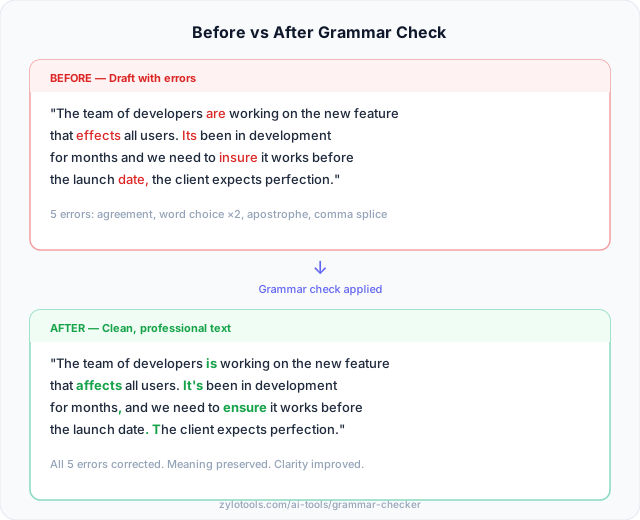
The errors I actually care about catching
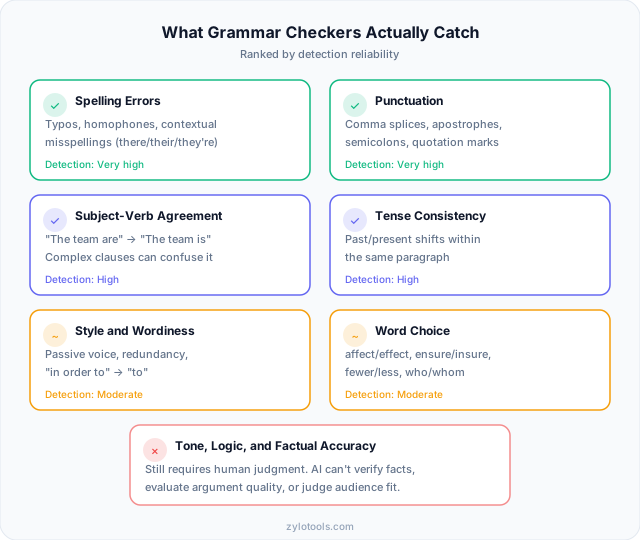
Let me be specific about what I need a grammar checker to find. Typos are table stakes — even my phone catches those. The errors that slip through my self-editing and actually matter are more subtle.
Contextual spelling errors
Not misspellings. Correctly-spelled wrong words. "The affect was immediate" when I meant "effect." "It's" when I meant "its." "Compliment" when I meant "complement." A basic spell-checker waves these through because they're real words. A good grammar checker understands context well enough to catch them.
These are the errors that make professional writing look careless. They suggest the writer doesn't know the difference — even when they do and simply typed quickly.
Comma splices
This is the single most common error in professional writing, and I include my own drafts in that claim. A comma splice joins two independent clauses with just a comma: "The report is finished, we should send it today." It should be a period, semicolon, or conjunction.
I write comma splices constantly in first drafts because my thoughts connect fluidly. The grammar checker catches them. Every time. This alone justifies the tool.
Subject-verb agreement across complex clauses
Simple cases are easy: "The dog run" is obviously wrong. But what about: "The collection of vintage guitars that he acquired over twenty years of touring are now worth millions"? Should be "is now worth millions" — the subject is "collection," singular, not "guitars." When phrases pile up between subject and verb, my brain loses track. The checker doesn't.
Tense shifts within paragraphs
Starting a paragraph in past tense and accidentally switching to present midway through. "She walked into the office and notices the email immediately." My brain knows what I meant. The reader stumbles. A grammar checker flags the inconsistency before it reaches anyone.
Wordiness and redundancy
"At this point in time" instead of "now." "In order to" instead of "to." "Due to the fact that" instead of "because." I don't write these deliberately, but they creep in during fast drafting. The best grammar tools don't just catch errors — they catch bloat. They help me say the same thing in fewer words, which is almost always better.
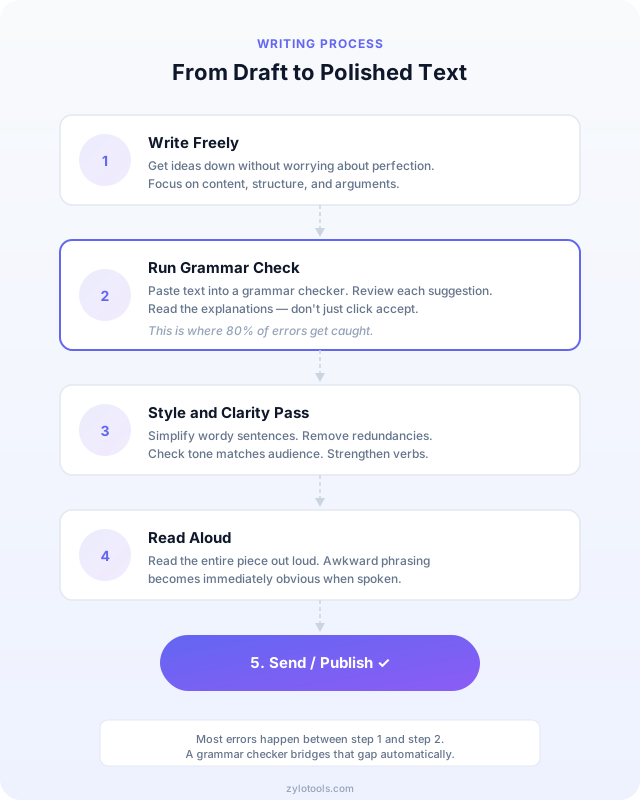
Here's my actual editing workflow
I didn't arrive at this process theoretically. I tried different approaches and this is what stuck — what actually produces clean writing without killing the creative momentum that makes first drafts worth reading.
Step 1: Write the draft without any checker active
This is non-negotiable for me. If I see red underlines while writing, I stop to fix them. That breaks flow. I lose the thread of my argument. The sentence I was about to write — the one that would have been perfect — evaporates because I stopped to change "their" to "there."
Drafting and editing are different modes of thinking. Trying to do both simultaneously makes you worse at each. Write freely. Let errors happen. They're not permanent.
Step 2: Run the check on the complete text
Once the draft is done, I paste the full text into a grammar checker. The complete document, not sections. Context matters — a grammar tool that sees the whole piece can catch tense inconsistencies across paragraphs that it would miss checking paragraphs individually.
Step 3: Review each suggestion individually
I don't accept all. I read each suggestion, understand why it's flagged, and decide whether it's correct. Sometimes the tool is wrong. Sometimes it's technically right but the "error" is an intentional stylistic choice. A sentence fragment for emphasis. A comma splice in dialogue. These stay.
This step is where learning happens. The more you engage with explanations, the fewer errors you make in future drafts.
Step 4: Do a final out-loud read for flow
After accepting corrections, I read the piece aloud. This catches what no grammar checker can: awkward rhythm, unnatural phrasing, sentences that are technically correct but sound terrible. Your ear knows things your eye misses.
If I stumble while reading aloud, something needs rewriting — regardless of what the grammar tool says.
What grammar checkers still can't do (and probably never will)
I'm genuinely impressed by how far these tools have come. But I also think it's important to be clear-eyed about their limitations. Overstating what they do sets people up for disappointment — or worse, for publishing work that was "checked" but not actually edited.
They can't evaluate your argument
A grammar checker will happily approve a perfectly-constructed paragraph that contains a logical fallacy, a factual error, or a completely unsupported claim. Grammatical correctness and intellectual rigor are different dimensions entirely. Your argument can be wrong in flawless prose.
They can't tell if your tone matches your audience
Is this email too casual for a CEO? Too formal for a peer? Too aggressive for a customer complaint response? Tone calibration requires understanding social context, power dynamics, and relationship history. No grammar tool has access to that information, and even if it did, these judgments are inherently subjective.
They can't verify facts
If you write "Paris is the capital of Germany," a grammar checker will approve it. The grammar is fine. The fact is wrong. These tools parse language structure, not truth. Fact-checking remains a human responsibility — and a critical one.
They can't distinguish intentional style from error
A sentence fragment might be a mistake. Or it might be deliberate emphasis. "Because reasons." A grammar tool flags both identically. The judgment about which is which requires understanding the writer's intent, the piece's overall voice, and the conventions of its genre. That's fundamentally a human evaluation.
The specific mistakes professionals still make
These aren't beginner errors. I see them in published articles, in emails from executives, in marketing copy from agencies. They persist because they're subtle and because spell-check doesn't catch them.
Comma splices
The quarterly results exceeded expectations, the board was pleased.
Correct: The quarterly results exceeded expectations. The board was pleased.
Two independent clauses need more than a comma between them. Period, semicolon, or a conjunction. This is the error I fix most often in my own writing and in others'.
Who vs. whom
Who did you send the report to?
Correct: Whom did you send the report to?
If you can substitute "him," use "whom." If you can substitute "he," use "who." You sent it to him, so it's whom. Most people have stopped caring about this distinction in casual writing, but formal contexts still expect it.
Affect vs. effect
The new policy will effect employee morale.
Correct: The new policy will affect employee morale.
"Affect" is usually the verb (to influence). "Effect" is usually the noun (the result). The exceptions exist but are rare enough that this rule covers 95% of cases. A good grammar tool like our free grammar checker catches these contextual mix-ups reliably.
Less vs. fewer
We received less complaints this quarter.
Correct: We received fewer complaints this quarter.
"Fewer" for things you can count (complaints, people, items). "Less" for things you measure (time, money, water). The express lane sign should say "10 items or fewer," and yes, it bothers me every time.
Dangling modifiers
Running late for the meeting, the elevator doors closed before I could get in.
Correct: Running late for the meeting, I watched the elevator doors close before I could get in.
The introductory phrase needs to modify the subject that follows it. The elevator wasn't running late — I was. These errors often create unintentionally funny mental images, which is entertaining but unprofessional.
Which contexts benefit most from grammar checking
Not all writing benefits equally from automated grammar checking. Here's where I've found the return on effort is highest — and where it matters less.
Business emails: highest ROI
You write dozens of emails a day. Each one represents you professionally. A grammar error in a client email or executive update creates an impression of carelessness that's hard to undo. But you also don't have time to carefully proofread every message.
This is where a grammar checker earns its keep. Quick paste, scan corrections, send with confidence. Thirty seconds that prevent reputation damage. If you're choosing one context to always check, make it outbound professional emails.
Blog and content writing: consistency across volume
When you publish regularly — weekly posts, documentation updates, marketing copy — quality tends to slip during crunch periods. A grammar checker maintains a consistent baseline regardless of how rushed you are. Your readers don't know (or care) that you wrote this article at 11 PM on a deadline. They just notice the errors.
Tools like a text summarizer can help you tighten verbose drafts, but the grammar checker catches the mechanical errors that undermine reader trust.
Academic papers: formal conventions
Academic writing has conventions that even experienced writers trip over: consistent tense usage in literature reviews, proper parallel structure in lists, the specific comma rules around restrictive vs. non-restrictive clauses. Grammar checkers are excellent at enforcing these mechanical conventions so you can focus on your actual argument.
ESL writers: article usage and prepositions
If English is your second (or third) language, grammar checkers provide something no amount of textbook study can: immediate, contextual feedback on the specific errors you make in your actual writing. Articles ("a" vs "the" vs nothing) and prepositions ("interested in" not "interested on") follow patterns that are genuinely difficult to learn through rules alone.
The grammar checker serves as a patient native speaker who corrects you in real-time without judgment. Over time, the patterns become instinct. I've watched ESL colleagues reduce their error rate dramatically just by paying attention to the corrections on their daily emails.
| Context | Primary Benefit | Key Error Types |
|---|---|---|
| Business emails | Professional credibility | Tone, comma splices, wordiness |
| Blog content | Consistent quality at volume | Tense shifts, passive voice, redundancy |
| Academic papers | Formal convention compliance | Agreement, parallel structure, citations |
| ESL writing | Pattern learning through practice | Articles, prepositions, collocations |
Frequently Asked Questions
Can a grammar checker replace a human editor?
No, and trying to use one that way will disappoint you. Grammar checkers handle the mechanical layer — spelling, punctuation, agreement, tense consistency. They're like a very thorough spell-check on steroids. But human editors do something fundamentally different: they evaluate meaning. Does your argument hold together? Is this paragraph in the right place? Will your audience react the way you intend? Those questions require understanding context, intent, and audience — things no automated tool can assess. The ideal approach uses both: let the checker clear the mechanical noise first, then bring human judgment to the structural and stylistic questions.
Are free grammar checkers accurate enough for professional use?
Modern NLP-based grammar checkers are surprisingly capable. They reliably catch comma splices, subject-verb disagreement, tense inconsistency, and contextual spelling errors — the issues that actually matter in professional writing. Where they struggle is with domain-specific jargon (legal terminology, medical abbreviations, industry acronyms) and unconventional but intentional stylistic choices. For standard business communication, reports, and documentation, a good free tool is absolutely sufficient. For high-stakes published content, use the tool as a first pass, then apply human proofreading for the edge cases it can't evaluate.
Do grammar checkers work for non-native English speakers?
They're actually more useful for ESL writers than for native speakers. The specific errors that non-native writers make — incorrect article usage, wrong preposition choices, unnatural collocations — are precisely the patterns that modern grammar tools detect well. A native speaker instinctively knows it's "interested in" not "interested about," but an ESL writer might not. The tool catches it instantly and, crucially, the explanations serve as ongoing English lessons. Over months of consistent use, ESL writers internalize these patterns and make fewer errors naturally. It's like having a patient tutor reviewing every sentence you write.
Will using a grammar checker actually improve my writing over time?
Yes — but only if you engage with the corrections instead of blindly clicking "accept all." The learning loop works like this: the tool flags an error, you read the explanation, you recognize the pattern next time you're about to make the same mistake, and gradually the rule becomes instinct. The key word is "gradually." It happens over weeks and months, not days. Writers who pay attention to correction explanations consistently report that their error frequency drops over time. Think of it like autocorrect for your brain — repeated exposure to the right pattern eventually overwrites the wrong one. But you have to actually read the explanations for this to work.
Are browser-based grammar checkers private?
It depends entirely on architecture, not branding. A grammar checker that processes text locally — using JavaScript or WebAssembly running in your browser — never sends your writing anywhere. Your text stays on your device, period. No server ever sees it, no database ever stores it, no one can access it. Cloud-based checkers, by contrast, must transmit your text to remote servers where the NLP processing happens. That text could be logged, used for model training, or potentially exposed in a security breach. For sensitive documents — legal work, HR communications, financial reports — only local processing provides genuine privacy. Always check whether a tool processes locally or remotely before pasting anything confidential.
What's the difference between a grammar checker and a spell checker?
A spell checker only knows whether individual words exist in its dictionary. It catches "teh" as a misspelling but approves "their" even when you meant "there" — because "their" is a real word. A grammar checker understands sentence structure and context. It knows that "their" is a possessive pronoun and "there" refers to a place, and it can determine which one you likely intended based on the surrounding words. Grammar checkers also evaluate punctuation, sentence structure, tense consistency, and stylistic issues that exist at a level above individual words. Modern tools combine both capabilities, but the grammar layer is what catches the errors that actually matter in professional writing.
Stop wondering. Start checking.
Paste your text, get corrections in seconds. No signup, no word limits, no paywalls. Your text stays in your browser — we never see it.
Check Your Writing — Free →