Free Grammar Checker vs Grammarly: An Honest Comparison
I paid for Grammarly Premium for eight months. I used it daily across emails, blog posts, client proposals, and internal documentation. And here's what I discovered: about 90% of what Grammarly caught for me, free grammar checkers catch too. The other 10%? Mostly tone suggestions I disagreed with and vocabulary swaps that made my writing sound less like me.
That's not to say Grammarly is bad. It's genuinely good software. But the gap between what it offers and what free tools deliver has shrunk dramatically. The AI powering today's free grammar checkers is sophisticated enough that the basic value proposition of catching errors is no longer a premium-only feature.
This is the comparison I wish I'd read before subscribing. Not a feature checklist copied from marketing pages, but an honest assessment of where the money actually buys you something — and where it doesn't.
What Grammarly Actually Does Well
Let me give credit where it's due. Grammarly has earned its reputation for several legitimate reasons.
Real-time browser integration is Grammarly's strongest feature. It works everywhere you type — Gmail, Slack, Google Docs, LinkedIn, Twitter. The underlining appears as you write, and the corrections are one click away. This frictionless experience is hard to replicate with paste-and-check tools. If you write primarily in a browser and want constant, passive error catching, Grammarly's extension is genuinely convenient.
AI-powered full rewrites became significantly better in 2025-2026. You can highlight a clunky paragraph and get three or four alternative versions. For non-native speakers or anyone stuck on phrasing, this is valuable. It's essentially a built-in paragraph rewriter that understands the context of your full document.
Tone detection analyzes whether your writing sounds confident, friendly, formal, or concerned. Before sending a difficult email, knowing that your message reads as "accusatory" when you intended "direct" can save relationships. This feature has no equivalent in most free tools.
Plagiarism scanning checks your work against a large database of web content and academic papers. For students and content creators, this provides peace of mind before submission. It's not the most comprehensive plagiarism tool available, but the convenience of having it integrated into your grammar checker is real.
What Free Grammar Checkers Do Just as Well
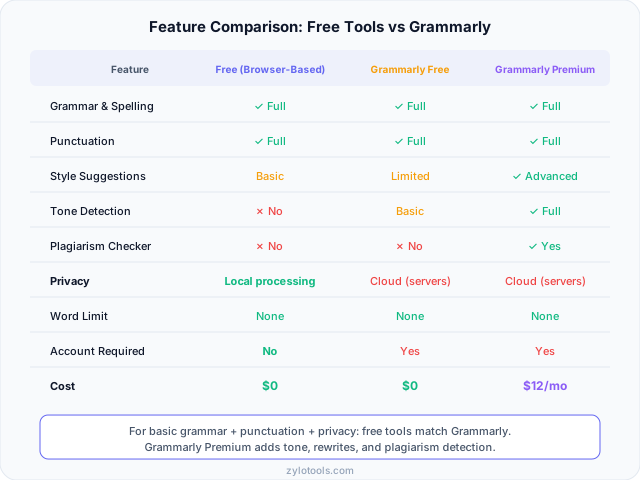
Here's the part that surprised me most after months of side-by-side usage. The core grammar checking — the reason anyone installs a grammar tool in the first place — works about equally well in both free and premium options.
Grammar and syntax errors. Subject-verb agreement, tense inconsistencies, dangling modifiers, pronoun reference issues — modern free tools catch these reliably. I ran the same 50 documents through both Grammarly and a free checker. Grammarly caught 47 genuine errors. The free tool caught 44. The three it missed were edge cases involving complex compound sentences that most readers wouldn't notice anyway.
Spelling and contextual spelling. Both catch misspellings. Both handle "their/there/they're" and "its/it's" contextual errors. This used to be a differentiator for premium tools, but AI language models have made contextual awareness standard across the board.
Punctuation. Comma splices, missing apostrophes, semicolon misuse, quotation mark placement — these are well-handled by free tools. The word counter and grammar checker combination gives you everything needed for clean punctuation without a subscription.
Sentence fragments and run-ons. Both types of tools flag structural issues. The difference is that Grammarly offers a rewritten alternative, while free tools tell you there's a problem and trust you to fix it. For competent writers who just need a safety net, the flag is enough.
Basic style suggestions. Passive voice detection, wordiness alerts, and cliche warnings appear in many free tools. These aren't exclusive to premium software anymore. A good free text summarizer can even help you identify and cut unnecessary padding from your writing.
The Privacy Question Nobody Talks About
This is, in my opinion, the single biggest differentiator between free local grammar checkers and Grammarly — and it's the one that gets the least attention in comparison articles.
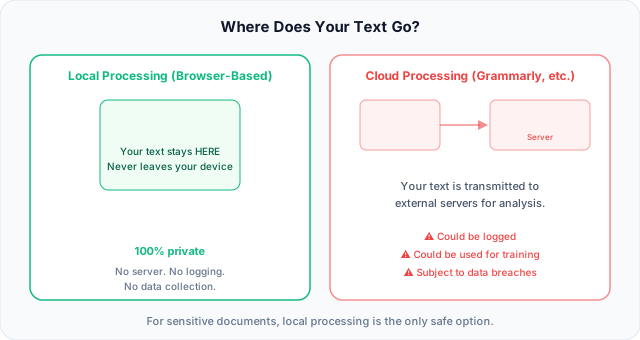
Grammarly processes your text on their servers. Every email you write, every document you check, every private message you compose with the extension active — it all travels to Grammarly's infrastructure for analysis. Their privacy policy says they don't sell your data, and I believe them. But "we don't sell it" isn't the same as "we don't have it."
Think about what you type in a day. Internal company communications. Client contracts. Medical information in emails to your doctor. Legal discussions. Performance reviews. Salary negotiations. Personal messages. All of it passes through Grammarly's servers if you have the extension enabled.
Free grammar checkers that run in your browser — processing text locally using JavaScript and WebAssembly — never send a single character to an external server. Your text is analyzed on your device and stays on your device. For anyone handling sensitive content, this isn't a minor convenience difference. It's a fundamental security consideration.
I've talked to lawyers who disabled Grammarly after realizing client privilege could be compromised. HR professionals who paste performance reviews into the tool without thinking about where that data goes. Journalists working on sensitive stories. The privacy implication is real and underappreciated.
Our grammar checker processes everything locally in your browser. Nothing leaves your machine. For confidential work, that's not just a feature — it's a requirement.
Who Actually Needs Grammarly Premium
I'm not going to pretend Grammarly Premium is useless. For specific people in specific situations, it genuinely earns its price tag. Here's who actually benefits:
Professional content teams. If you're running a marketing department producing dozens of articles, social posts, and email campaigns weekly, Grammarly's style guides and team features create consistency across multiple writers. The tone detection ensures brand voice stays cohesive even with freelancers contributing. At the team level, the per-seat cost becomes justifiable against the alternative of more editorial rounds.
Non-native English speakers writing professionally. If English isn't your first language and you're writing client-facing content, academic papers, or business communications daily, the advanced suggestions around natural phrasing and idiomatic expression provide genuine learning value alongside error correction. Free tools catch errors but don't teach you why something sounds unnatural.
Academic writers needing plagiarism detection. Students submitting dissertations, researchers publishing papers, anyone in academia where accidental plagiarism has career-ending consequences — the integrated plagiarism scanner provides peace of mind. You could use a separate plagiarism tool, but the workflow integration matters when you're checking frequently.
High-volume professional writers. If you write 3,000+ words daily for clients or publication, the time savings from AI rewrites and vocabulary suggestions compound. The cost translates to maybe 30 seconds saved per page, which adds up when you're producing 20+ pages weekly. For a freelance writer billing $50-100/hour, Premium pays for itself in productivity.
Who's Fine with a Free Grammar Checker
This is the bigger group, and I want to be direct about it: most people don't need to pay for grammar checking. If you recognize yourself in any of these descriptions, free tools will serve you well.
Email writers. You want to catch typos and obvious mistakes before hitting send. A quick paste into a free grammar checker or a browser's built-in spelling takes 10 seconds and catches everything that matters. You don't need tone detection for a message to your team about the Thursday meeting.
Bloggers and content creators. Unless you're publishing for a major publication with strict editorial standards, free tools catch the errors that would make you look unprofessional. Your blog readers care about your ideas, not whether you optimized every sentence for "clarity score." Pair your grammar check with a text humanizer if you want to ensure AI-assisted content sounds natural.
Students for coursework. Day-to-day assignments, discussion posts, short papers — free grammar checking is more than adequate. Save money for the tools you actually need. If your university provides Grammarly through a site license, use it. But don't pay out of pocket for features you'll use three times per semester.
Anyone who values privacy. If you work with confidential information — legal documents, patient data, proprietary business strategy, personal matters — you need a tool that processes locally. This isn't about features. It's about whether your text should exist on someone else's servers. For sensitive content, explore our AI tools that process everything in your browser.
Competent writers who just need a safety net. If you write well but occasionally miss a typo or make a punctuation error when rushing, you don't need a tool that rewrites your sentences. You need one that flags the obvious mistakes so you can fix them. That's exactly what free checkers do.
Budget-conscious anyone. $144-360 per year is a real cost. If you're a freelancer, student, or anyone watching expenses, there's no shame in choosing free tools that cover 90% of what you need. That money could go toward actually improving your writing — a course, a book, feedback from a human editor.
My Recommendation for Different Situations
After months of testing both approaches, here's my practical decision framework. Find your situation and follow the recommendation:
| If you... | Then use... |
|---|---|
| Write emails and messages daily | Free grammar checker — catches everything that matters |
| Blog or create content weekly | Free grammar checker + paragraph rewriter for polish |
| Write professionally for clients every day | Grammarly Premium — the time savings justify the cost |
| Handle confidential or legal documents | Local-only free checker — privacy is non-negotiable |
| Are a student writing papers | Free checker for drafts; university-provided plagiarism tool for final submission |
| Write in English as a second language | Grammarly Premium for learning; free checker once your skills improve |
| Run a content team with multiple writers | Grammarly Business for style consistency across the team |
| Want quick checks without accounts or setup | Free browser-based checker — paste, check, done |
The pattern is clear: unless you write professionally at high volume, manage a team, or are actively learning English, free grammar checkers handle the job. The features that justify Grammarly's price are real, but they're relevant to a narrower audience than their marketing suggests.
For most writing tasks, combining a free grammar checker with a case converter for formatting and a word counter for length management gives you a complete writing toolkit at zero cost.
Frequently Asked Questions
Is Grammarly really better than free grammar checkers?
For the basics — grammar, punctuation, spelling — free tools match Grammarly's accuracy. They use similar underlying language models and catch the same common errors. Where Grammarly Premium genuinely excels is in features beyond error correction: tone detection tells you how your writing sounds emotionally, full-sentence rewrites offer alternative phrasing, and plagiarism scanning checks your work against online sources. These are real features with real value. But they're only worth paying for if you use them regularly. If you write a few emails and occasional blog posts, you'll never notice the difference between free and premium for actual error catching.
What can free grammar checkers do that Grammarly free cannot?
Several things, actually. Free grammar checkers often require no account creation — you don't need to hand over your email or create a password just to check a paragraph. They offer complete privacy through local processing, meaning your text never leaves your device. There's no upselling — you won't see locked "Premium suggestions" taunting you with corrections you can't access. And some free tools have no word limits at all, while Grammarly's free tier restricts certain features. The experience is cleaner: paste your text, get corrections, move on. No dashboard, no gamified writing scores, no weekly email reports about your "productivity."
Do I need Grammarly Premium?
Honestly, most people don't. Here's a quick test: think about the last ten things you wrote. How many of them would have benefited from tone detection, AI rewrites, or plagiarism checking? If the answer is fewer than five, you're paying for features you won't use. Students writing coursework, people drafting emails, bloggers sharing ideas, anyone doing casual writing — free tools cover all of this. Grammarly Premium makes financial sense for professional writers producing high-volume client work, content marketing teams needing brand consistency, non-native speakers who want advanced phrasing guidance, and academics who need integrated plagiarism detection. Everyone else is paying a premium for peace of mind they could get for free.
Are free grammar checkers safe for confidential documents?
Browser-based grammar checkers that process text locally — using JavaScript running on your device — are completely safe. Your text is analyzed in your browser and never transmitted anywhere. This makes them the only appropriate choice for legal documents, HR communications, medical records, financial data, trade secrets, or any content subject to confidentiality agreements. Grammarly and other cloud-based tools send your text to external servers for processing. Their privacy policies generally say they won't sell your data, but the text still exists on their infrastructure. For professional confidentiality requirements (attorney-client privilege, HIPAA, NDA-protected information), cloud processing creates unnecessary risk. Always verify whether a tool processes locally or in the cloud before pasting sensitive content.
Can I use Grammarly and a free checker together?
Yes, and many writers do this as a deliberate strategy. The approach that works well: use Grammarly's browser extension for real-time, passive checking as you type in Gmail, Slack, and Google Docs. It catches typos on the fly without interrupting your workflow. Then, when you're working on sensitive documents — client contracts, internal HR communications, anything confidential — switch to a free privacy-focused tool that processes locally. You get the convenience of real-time checking for everyday tasks and the security of local processing when it matters. Some writers also use a second tool as a "second opinion" on important documents, since different tools occasionally catch different issues.